
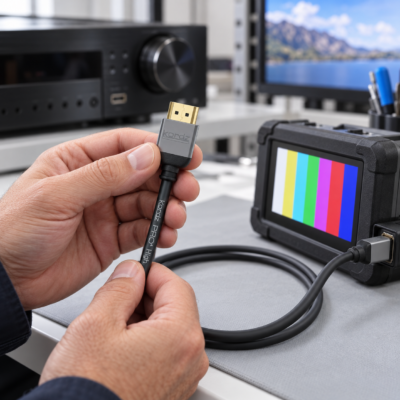
An HDMI connection is installed and working, then loses its picture when the television is pushed against the wall. A streaming menu displays correctly, but the screen goes black when a movie starts. A gaming system runs at one setting and becomes unstable at another.
For an integrator, these scenarios can turn a small component into hours of troubleshooting. Prevention starts with choosing a cable for the actual signal, routing it carefully and then verifying the completed system against the home owner’s real-world use conditions.
HDMI issues can be difficult to troubleshoot. Some cable failures begin elsewhere in the system. A loose connection, an unsupported feature or a device configuration problem can all produce similar symptoms. But where should you start? And, more importantly, how can you avoid issues altogether?
The following guide explains what to check, how to prevent recurring problems and where Kordz and Future Ready Solutions fit into the installed solution.
>
Insufficient Bandwidth for the Required Signal
A cable that works with an older source may become unreliable after a display or gaming upgrade. Higher refresh rates, greater color depth and different chroma formats can change the bandwidth required, even when the resolution remains 4K.
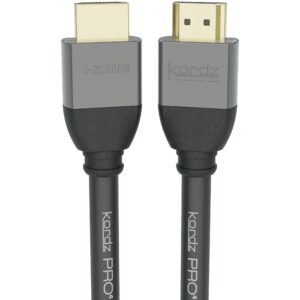 Specify the intended video format before choosing the cable. HDMI’s Premium High Speed certification covers 18Gbps, while Ultra High Speed certification covers configurations up to 48Gbps. Those are distinct performance categories; a broad description such as “4K compatible” does not tell you everything the installation needs to support. Verify the exact model, length and certification claim.
For short and medium connections, Kordz PRO4 Passive HDMI Cables support 48Gbps across the published 0.5–9m range and undergo individual production testing. They also support eARC, making them an option for compatible television and audio-system connections.
If reducing resolution or refresh rate restores stability, use that result to investigate the signal path. It does not, by itself, prove that the cable is defective. The receiver, switcher, selected HDMI port or its settings may also limit the operating format. Restore and verify the customer’s required settings before calling the problem solved.
>
Loose Connections and Mechanical Strain
A partially seated connector or a cable pulling sideways on a port is a common cause of picture drops after a rack or display moves. Plan the cable route so the connector enters the socket straight, with enough clearance for the connector body and the cable’s bend.
Support the cable near the equipment and leave enough service slack for the intended movement. Avoid making the HDMI socket carry the weight of a hanging cable bundle.
Kordz R.4 HDMI Cables address practical rack constraints with compact connector assemblies, 48Gbps performance, DPL Labs testing and nominal 2kg connector retention. The series is available in 1–10ft lengths, giving installers options for dressing individual rack connections.
Finally, it’s important to understand that cable retention describes resistance to the plug being withdrawn. Cable support and strain relief are still necessary, and a retention specification should never be treated as a permissible hanging load.
>
Damage During Pulling and Final Installation
A cable can arrive on the job site in good condition and be compromised during installation. Sharp bends, folding and crushing can disturb the cable’s internal construction. A working HDMI cable can also become stressed when the final rack position or display mount leaves less clearance than expected. In their popular HDMI Demystified Series, Kordz specifically cautions against folding cables and exceeding their bend requirements.
Before pulling any cable, inspect the route for tight transitions and pinch points. Protect connector heads, follow the manufacturer’s pulling instructions and use the minimum bend radius specified for the exact cable. Choose supports that hold the cable without compressing its jacket.
Check those details again with the equipment in its final position. A successful test while the television is pulled away from the wall does not establish that the cable will remain unstressed when the mount is closed.
Where possible, always plan a serviceable pathway. An accessible route or suitable conduit makes a future replacement much less disruptive than a cable permanently trapped behind finished surfaces.
>
A Cable Run Beyond the Selected Product’s Capability
HDMI does not have one universal maximum cable length. Usable reach depends on the cable’s construction, the signal being carried and the connected equipment. A distance rule borrowed from another installation (or even a premium cable’s actual length) cannot therefore guarantee successful signal transmission with all HDMI-enabled electronics.
 Measure the actual pathway, including vertical sections, rack routing and service slack. Where a passive cable cannot meet the requirement, consider an active optical cable, HDMI over twisted pair extender set or HDMI over fiber extender set.
Kordz PRO4 Active Optical HDMI Cables provide a 48Gbps option in lengths from 7.5m to 100m. The range accommodates longer source-to-display connections, such as a rack-to-projector run.
As with any active optical installation (and, frankly, and HDMI installation in general), keep unnecessary couplers and adapters out of the design. Each added connection becomes another item to qualify and troubleshoot. If a wallplate or adapter is required, test it as part of the complete installed path.
>
Active Cables Installed Backward or Without Sufficient Power
 Active HDMI cables contain electronics, and directional models must be installed with the correct end at each device. Reversing the source and display ends can leave an otherwise sound cable unable to operate. Check the markings before pulling it through a wall or ceiling.
The source end belongs at the equipment transmitting signal into that cable. The destination end belongs at the display or projector. Label both ends and test the intended equipment combination before committing to a route that will be inaccessible in the future (such as a closed wall or drop ceiling space).
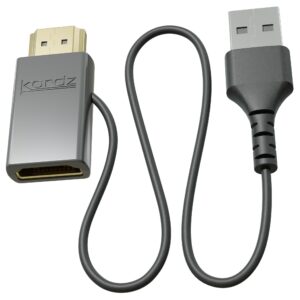
Power — or specifically the lack thereof — is another cause of active cable issues. When a source does not supply enough power for a an active HDMI cable, an inline injector is typically required. For example, the Kordz PRO4 HDMI 5V Power Injector adds 5V through a USB-A power connection.
>
A Working Picture but Missing Return Audio
Audio Return Channel and Enhanced Audio Return Channel, better known as ARC and eARC, let a television send audio back to a receiver, soundbar or other audio distribution solution. That return path needs its own verification. A picture on the screen does not establish that HDMI audio will reach the receiver or soundbar.
Confirm that the devices support the intended audio return function and that the cable connects their designated ARC/eARC ports. Check the relevant audio output settings and the manufacturer’s configuration instructions.
If the design depends on eARC over a longer distance, specify a cable or extension solution that explicitly supports it. Include the customer’s commonly used television apps and audio formats during commissioning.
>
Device Communication and Compatibility Problems
An HDMI connection also carries information that helps equipment establish the link. EDID communicates display capabilities to a source, while HDCP authenticates connections for protected content. Problems with those exchanges can affect the image even when the cable has no visible damage.
Start by confirming the selected input, supported signal formats, port settings and manufacturer-recommended firmware. Then simplify the path: connect the source directly to the display with a short cable already verified for the required format. Not surprisingly, this simple practice is recommended by both consumer and professional equipment manufacturers, and it is even a recommended troubleshooting step in Apple’s own Apple TV support guidance.
If a short direct connection works, add the receiver, switcher and other elements back one at a time. The direct test points toward something in the bypassed path; it does not identify which component or cable caused the original fault.
Also distinguish repeated dropouts during playback from a brief transition when the signal format changes. For example, Apple notes that matching dynamic range or frame rate can cause a blank or flickering screen while the television switches formats when playback starts or stops. That behavior alone is not evidence of a damaged HDMI cable.
>
Verify the System Before Handover
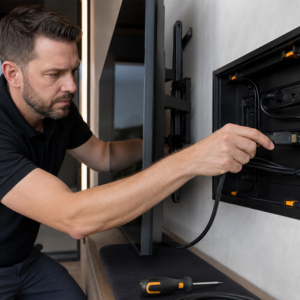 Best practice is to make the following checks part of an HDMI installation plan. Test the cable with the intended equipment before pulling it, again after routing it, and once the equipment is in its final position.
- Verify the actual operating format. Confirm the intended resolution, refresh rate, HDR settings and audio format. A menu screen or a lower-resolution test cannot establish performance at the specified format.
- Exercise normal use. Try the customer’s sources, input switching, standby and wake-up. Include ARC or eARC when the design uses return audio.
- Check final cable routing. Close the rack and move adjustable mounts through their intended range. Look for tension, pinching and connectors that cannot fully seat.
- Observe the operating environment. Check ventilation and cable routing near electrical equipment. If failures correlate with lighting changes or equipment warming up, include those conditions in the investigation.
- Record the result. Label each end and document the cable model, length, connected ports and tested settings. This gives the next technician a useful starting point.
For difficult intermittent faults, use test equipment appropriate to the required signal format. A simple continuity check cannot establish high-bandwidth performance or confirm successful EDID and HDCP operation.
>
HDMI Cables as Part of the System Design
Preventing HDMI problems requires a match between signal requirements, cable construction and installation conditions. Kordz gives integrators useful options for that work, including PRO4 passive cables, R.4 rack cables, PRO4 active optical cables and other HDMI extension solutions and accessories.
Specify the needed features, protect the cable during installation and verify the complete system at handover. Those steps give a project a stronger basis for dependable operation and make future troubleshooting more straightforward.
Explore the complete line of Kordz HDMI solutions at Future Ready Solutions, or contact us for help matching the cable and accessories to your next installation.